-
Piezoelement. Temperature sensor
-
Purpose of the lecture: Creating your own function. The purpose and role of the temperature sensor and piezoelectric element. Lecture content:
1.1. Creating your own function
1.2. Piezoelectric element. Function ton (pin, frequency, duration).
1.3. Temperature sensor. Technical Specifications of TMP36 Didactic units: piezoelectric element, temperature sensor, functions
7.1. Creating your own function A function is a piece of program code that can be accessed from another place in the program. In short, this is a set of commands that can be invoked by referring to this function by name. You can say that a function is a kind of one small library. The syntax for writing a function is as follows. Remember! <Data type> <function name> (<parameter set>) {function body} Each function has a data type int, float, byte, long, double, Boolean, single, real, word, shortint, etc. to which the function name is assigned. Parameters are specified in parentheses, for example, integer or real variables. The function can be divided into two types. The first function returns nothing, and the second type returns something. If the function does not return anything, it is declared as the void data type, which means "void" from the English translation of the void setup function that you already know.() and void loop(). Functions that return values they are declared by the data type int, float, byte, long, etc. The keyword of the returned function is return. Here are some examples related to creating your own functions. In the first case, consider a function that returns nothing, i.e. the void data type.
Listing 7.1. Creating the myFunction() function void setup(){ Serial.begin(9600); } void loop(){ myFunction(); delay(200); } void myFunction(){ Serial.println("Tamura"); }
This function, presented in Listing 7.1, is performed as follows. A new function is being created with the data type and the name void myFunction(). In the body of the function, we write the Serial.println("Tamura") message output command. In order to output messages through the monitor port, we need to refer to this function, which is located in another function. In our case, this is void loop(). Having written the myFunction() function, we automatically display the message on the monitor screen. In the second case, consider a function that returns a certain value from one created function to another (listing 6.2).
Listing 7.2. The function that returns the value void setup(){ Serial.begin(9600); } void loop(){ int c; c = Sum(5,10); This program code works as follows. A new function is created with the name Sum and the parameters of the integer variables int Sum(int a,int b). Next, under this function, the formula for adding two variables result=a+b is set. In the void loop() function, the values 5 and 10 are assigned to these variables, then the Sum() function is sent to the body to add the result a+b. After adding the two variables to the value 15, the return statement returns void loop() with the assignment of a new variable int c and outputs the value to the monitor Serial.println(c). 6.2. Piezoelectric element. Ton function(pin, frequency, duration) A piezoelectric element is an electromechanical transducer, one of the varieties of which is a piezoelectric sound emitter, which is also called a piezoelectric speaker, simply a bell. A piezodynamic converts an electrical voltage into a membrane oscillation. These vibrations create the sound. The general view of the piezoelectric element is shown in Figure 7.1.
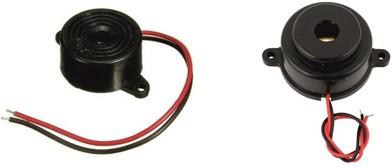
Fig.6.1. Piezoelectric element general view Now let's start writing the program code.
To generate sounds on an Arduino using a piezoelectric element, we will use the ton(pin, frequency, duration) function. Let's consider its essence and apply it in an experiment. The syntax of the ton(pin, frequency, duration) function is used to get a certain sound signal emitting from a piezoelectric element. In this function, the pin value is indicates the digital port number of the Arduino on which the signal will be played. Frequency is the frequency of the output sound expressed in hertz (Hz). If we want to specify the duration of the signal playback, then we can additionally run the duration command. Duration is the duration of the signal playback, expressed in milliseconds. Let's give an example of connecting a piezoelectric element (Fig.6.2).
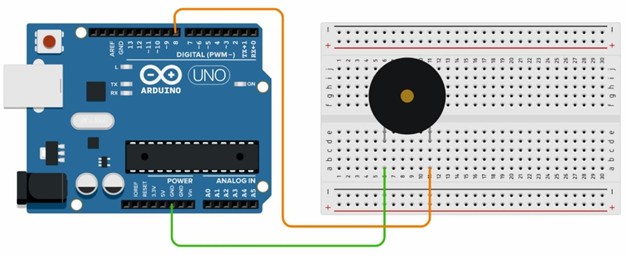
Figure 6.2. Piezoelectric element connection
-
